AI Native Development
Version control for context.
Point makes Sessions evolve like code—with immutable history, branches, parents, and a shared master.
AI Native work has a new history
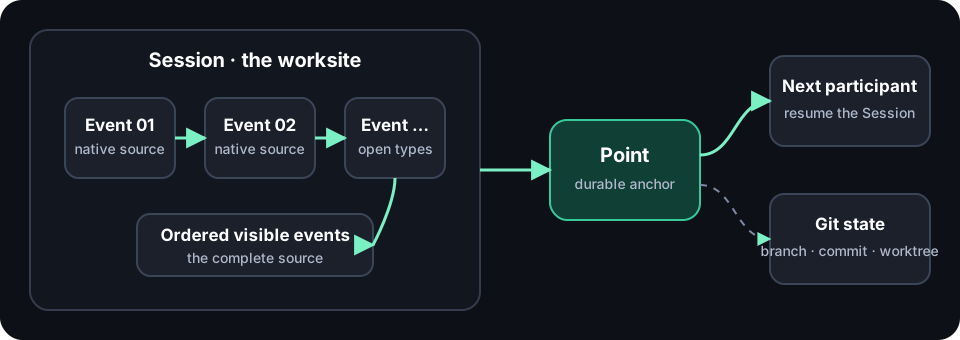
Intent, exploration, evidence, actions, corrections, and decisions unfold in a Session. Their original order is the live context where the work is created. Point preserves that Session without reducing it to a document or summary.
Git versions the repository. Point versions the context.
Session
The live, ordered working context exposed by an Agent runtime.
Point
An immutable new Session events connected to its source lineage.
Point Branch
A movable Ref that identifies a current context direction.
master
The context the project currently accepts and resumes by default.
Small primitives, many ways to work
Point does not prescribe a collaboration platform. It makes Sessions preservable, connectable, continuable, and shareable; the same primitives compose into different AI Native workflows.
Continue across Sessions and Agents
Stash a continuation boundary, then fetch and resume it in another Session, Agent, or device.
Explore in parallel from one source
Several Agents can create independent directions from one Point and reconnect them through a later decision Session.
Trace a project change to its worksite
A Commit Point connects context lineage to a Git Commit while preserving the semantics of both histories.
Create a context-only Workspace
An empty Git repository can become a shared Point Space and compose context from several projects.
Develop locally, let a cloud PMO follow
Publish Commit Points locally; an observer Agent in the cloud fetches each new boundary and uses it to provide reminders.
Connect several code repositories
A Workspace can add repositories as remotes, read their Point Branches, and continue from several sources.
Two ways context becomes history
Stash unfinished thought
point stash creates a Local Stash Point independently of git commit. Another local Agent can immediately read, resume, or branch from it.
Anchor a project change
When normal git commit records a repository change, the optional Point integration creates a Commit Point linked to that Git Commit.
Publish team context
Both Point kinds remain local until Push. Publishing makes the same immutable lineage stable and reachable for the team.
Old context remains a reference away
Each new Point stores only the visible events produced after the previous Point boundary. Its parents remain immutable Git objects referenced by ID.
Nothing is copied and nothing is lost. A full Resume traverses the DAG and reads every reachable Session once, even when several paths share the same ancestor.
master moves; history does not
Normal work starts from master. Resuming an exact historical Point starts detached work, so the accepted context does not move accidentally. A new direction gets its own Point Branch. Several directions converge only through a new Session that actually evaluates them.
Sessions are becoming development infrastructure
- OpenAI Codex keeps context across parallel project Threads and carries Session history across the App, CLI, and IDE extension.
- GitHub Copilot exposes Agent Sessions and logs, links Commits back to them, and supports Session sharing and history queries.
- Gemini CLI checkpoints Git state, complete conversation history, and Tool calls together; its Session workflow supports Resume, Rewind, and Fork.
- VS Code manages parallel local, background, and cloud Sessions with independent conversation history and Tool results.
- Claude Code persists project Sessions and supports Resume and Branch/Fork while retaining the original.
Different products are converging on the same idea: Session is becoming a durable, addressable, continuable AI Native development unit. Point makes its history project-owned, cross-agent, cross-team, and Git-native.
Stash. Resume. Commit. Publish.
1 · Stash
Preserve unfinished thought as a Local Stash Point.
2 · Resume
Load master, a historical Point, or several parent Points.
3 · Commit
Connect the real Session to the Git Commit created from it.
4 · Publish
Push the accepted branch and its required parent graph through Git.
Or install the Point Skill and say:
Stash this unfinished Session as a Point.
Resume the project context.
Commit this result with its Session.
Publish master to the team.
From Session history to intent history
Session is the first unit. The next layer is finer-grained intent: address an exact expression, response, result, or decision; connect it to a project change; and load only the smallest context needed while its complete Session remains reachable.
Point starts with version-controlled Sessions. Its direction is an intent graph grounded in the real worksite.